
Product Facts
- Product Name
- B&D Auto-Lock Automatic Garage Door Locking Bolt
- Availability
- In Stock
- Condition
- New
- Category
- Home & Garden > Home Security & Safety > Garage Door Security
- Seller
- BnD Garage Doors
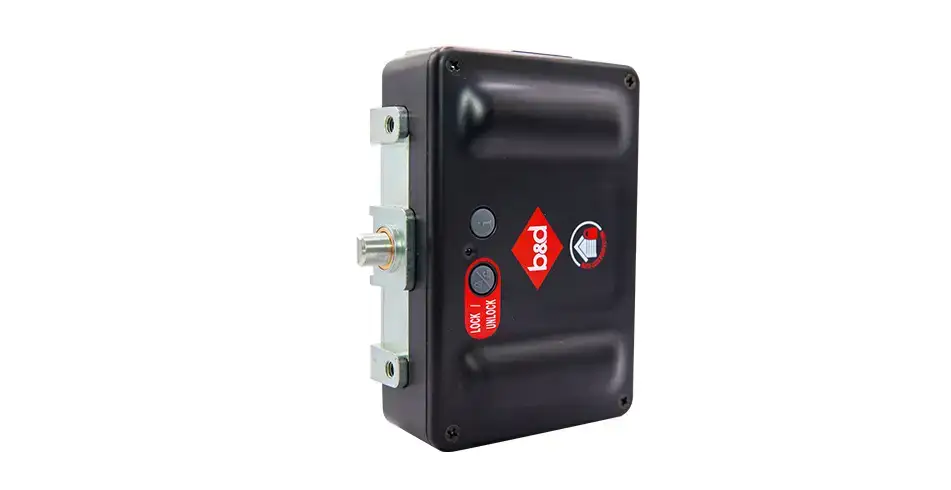
B&D Auto-Lock Automatic Garage Door Locking Bolt
Level up your garage door security with Auto-Lock; B&D's advanced automatic locking bolt specially designed to keep your home safe. This wireless, heavy-duty locking bolt automatically engages every time you close your garage door, more than doubling the force required to lift the door from a closed position. Features keyless technology operated via remote control or smartphone control.
B&D Auto-Lock
B&D Auto-Lock is a keyless, automatic locking bolt designed to add an extra layer of physical security to B&D sectional garage doors. It automatically locks your door every time you close it, so your door isn’t just shut — it’s locked shut.
What Auto-Lock does
- Locks shut automatically, every time you close your garage door using your normal remote operation.
- Uses a heavy-duty locking bolt that engages after the door closes.
- Is wireless (no additional wiring required) and designed to fit discreetly within the door system.
- Operates using your remote control, and can also be used with smartphone control (optional, when used with compatible smart control).
Why “shut” isn’t the same as “locked”
Many garage doors can be closed (“shut”) without being mechanically locked.
Auto-Lock adds a physical locking point. B&D explains that:
- A “shut” door typically requires around 30–50 kg of lifting force to open.
- With Auto-Lock engaged, the lifting force required can increase up to 450 kg at the lock point (based on a door using an engaged automatic opener).
This is the core security benefit: a locked door is significantly harder to force open than a shut door.
Compatibility and installation
Auto-Lock is intended for genuine B&D sectional garage doors and is installed by B&D Accredited dealers.
- Can be installed on a new garage door or an existing B&D sectional door.
- Works when paired with a compatible automatic opener, allowing it to lock and unlock as part of normal door operation.
- Auto-Lock may be included with some B&D configurations (availability can vary by product/package), so confirm inclusions with your dealer at time of purchase.
How Auto-Lock works
When closing
- Close your garage door as normal using your remote.
- Once the door is closed, Auto-Lock engages by sliding a locking bolt through the door’s rail/guide track.
- The door is now locked shut.
When opening
- Press the open button on your remote.
- The bolt automatically slides out of the rail/guard track.
- The door lifts as normal.
Lock status indicators (LEDs)
Auto-Lock includes red and green LED indicators to show lock status.
The status normally displays for 10 seconds after a lock movement or button press.
| Red LED | Green LED | Status |
|---|---|---|
| Flashing rapidly | — | Locking |
| On | — | Locked |
| — | Flashing rapidly | Unlocking |
| — | On | Unlocked |
| On | On | Error |
| Flashing slowly | Flashing slowly | Low battery |
| Flashing alternatively | Flashing alternatively | No link with basestation |
Manual lock operation (power outage or emergency)
Auto-Lock includes an emergency lock/unlock button on the front of the unit.
To disengage Auto-Lock in an emergency
- Press the emergency lock/unlock button on the front of the Auto-Lock.
- This disengages the locking bolt from the guide track.
- You can then disengage the opener (use your opener’s standard manual release procedure) and open the door.
Important: The emergency lock/unlock button is intended only for power outage or emergency, and is not to be used as the primary means of locking the door under normal circumstances.
Battery replacement
Auto-Lock is battery powered.
Battery type: 2 × C-LR14
Replace the batteries immediately if:
- The Auto-Lock red and green lights flash 3 times, or
- The red and green lights are flashing slowly (low battery indication).
Battery replacement steps
- Remove the cover by unscrewing the four screws on the main cover.
- Replace the batteries.
- Refit the cover and secure it with the screws.
- Test operation by using the opener to open and close the door.
Smartphone control (optional)
⚠️ Smart Hub Power Requirement: The B&D Smart Hub (HUB100) must be connected to power at all times. Do not disconnect power after setup.
Smartphone control works via your home’s WiFi network, and initial setup involves linking your phone app and compatible smart opener to your home network.
Typical setup flow:
- Download the B&D App.
- Remove the controls cover on the opener to access the buttons.
- Ensure the WiFi router is within range of the opener.
- Open the app and tap Get Started.
- Follow the in-app setup instructions.
- Refit the opener controls cover and test operation through the app.
When connected, you can view Auto-Lock operation and receive notifications when issues arise (where supported by the smart system).
Troubleshooting
Opener main light flashes 3 times
- Possible cause: Low battery indicator
- What to do: Change the Auto-Lock batteries, then test lock operation by pressing the lock/unlock button.
Door not moving and no lights on lock
- Possible cause: Limited battery power
- What to do: Press the (i) button on the lock to check for battery power.
- If no lights: change battery
- If lights: check LED status table above
Opener main light flashes 5 times
- Possible cause: Lock is not unlocked and preventing door moving
- What to do: Check lock and test by pressing lock/unlock button. If it does not move, arrange service.
Lock is not unlocking and preventing door movement
- Possible cause: Lock jammed
- What to do: Check if anything is obstructing the bolt movement. Press the unlock button on each lock. If it does not move, arrange service.
Red and green lights both solid on the lock
- Possible cause: Error with lock
- What to do:
- Press the unlock button on the lock to test operation
- Switch off power to the opener, then switch back on after 30 seconds
- If a battery backup is installed: press & hold STOP/SET on the opener until power ceases
- Press the lock/unlock button on the lock to test operation
- If it does not move, arrange service
Red and green lights flashing slowly
- Possible cause: Low battery
- What to do: Change batteries, then test operation by pressing lock/unlock button.
Red and green lights flashing alternately
- Possible cause: No link to opener/basestation
- What to do: Press the unlock button on the lock with flashing lights to disengage the bolt, then arrange service/assistance.
Caring for your Auto-Lock
Preventative servicing of your garage door, opener, and Auto-Lock is important.
- If Auto-Lock is in a very dirty/dusty environment, vacuum residue from the lock and bolt before continuing use.
- Do not use water, benzene, or alcohol when cleaning the product, as these fluids can cause malfunction.
Ongoing care helps the system function within factory specifications, reduces the risk of failure and repair costs over time, and helps you maintain warranty coverage.
Warranty
B&D Auto-Lock is covered by a one-year warranty.
Quick FAQs
Does Auto-Lock lock automatically every time?
Yes — it’s designed to lock your sectional garage door every time you close it using normal remote operation.
Is Auto-Lock keyless?
Yes — Auto-Lock is a keyless locking system.
What’s the difference between “shut” and “locked”?
“Shut” means the door is closed. “Locked” means a physical lock has engaged, making the door significantly harder to force open.
What batteries does Auto-Lock use?
2 × C-LR14 batteries.
What does alternating flashing red/green mean?
It indicates no link with basestation.
Can I use Auto-Lock with smartphone control?
Yes — smartphone control is optional and works via your home WiFi when paired with a compatible smart control system.
What should I do if the lock won’t unlock and the door won’t move?
Check for obstructions and use the lock’s troubleshooting steps (including the emergency lock/unlock button in an emergency). If the lock will not move, arrange service through your installer/dealer.
Product Data (OpenAI Spec)
View Full JSON Spec ↗Specifications
| Condition | new |
|---|---|
| Category | Home & Garden > Home Security & Safety > Garage Door Security |
Product Intelligence
B&D Auto-Lock Automatic Garage Door Locking Bolt
Overview
The Auto-Lock is an optional wireless accessory component designed for garage door and sectional door systems that functions as an automatic locking mechanism. It provides enhanced security by automatically sliding a bolt into the guide track when the garage door is closed, delivering convenient and reliable locking without manual intervention.
Technical Specifications
Power and Battery System
The Auto-Lock is powered by sealed lead-acid batteries, specifically:
- Battery Type: C-LR14 (alkaline batteries)
- Quantity: 2 batteries per lock unit (standard configuration)
- Battery Quantity: 4 batteries for dual lock systems
- Operational Duration: Battery status can be monitored via the information button on the drive unit
- Low Battery Indicator: Red and green LED lights flash slowly when battery replacement is needed
Wireless Communication
- Compatibility: Compatible with RDO-1V4 openers with firmware #59
- Operating Frequency: 433MHz wireless transmission
- Configuration Requirement: Must be set to Channel 2 during system configuration
- Wireless Basestation Module: Included for remote control functionality
- Re-Registration: Required every time the Auto-Lock is removed from the system
Physical Components
The Auto-Lock system comprises several integrated components:
| Component | Description | Quantity |
|---|---|---|
| Garage Door Lock (Main Unit) | Primary locking mechanism | 1-2 units |
| Lock Bolt | Sliding mechanism that engages the guide track | Integrated |
| Wireless Basestation Module | Enables wireless control | 1 |
| Drive Unit | Houses batteries and control buttons | Per lock |
| LED Status Indicators | Display lock status through color patterns | Built-in |
| Emergency Lock/Unlock Button | Manual override control | On front of unit |
| Wall Bracket | Mounting hardware | 2 per lock |
| Striker/Lock Striker | Engagement point in door guide | 2 per lock |
| Corrugated Plate | Door mounting component | 1 |
Installation Components
Standard bracket kits include:
- Button Head Screws: M6 x 10 (4 quantity)
- Taptite Black Screws: M3 x 14 (8 quantity)
- Alcohol Wipes: 2 quantity (for surface preparation)
- Velcro: For securing components
- 60mm Head Stop: Included in limited sideroom configurations
- Bracing Bar: For reinforcement in Neo systems
- Bracing Bar Angle Steel Clips: For secure mounting
Operational Features
Automatic Locking Mechanism
- Locking Action: The lock bolt automatically slides into the guide track when the garage door is fully closed
- Manual Control: Users can manually engage or disengage the lock using dedicated lock and unlock buttons directly on the device
- Emergency Features: Includes emergency manual lock and unlock functions for contingency situations
- Lock Status Display: Multiple LED status indicators show real-time locking status through color and pattern combinations
LED Status Indicators
The system displays lock status through specific light patterns:
| LED Pattern | Status |
|---|---|
| Red flashing rapidly | Locking in progress |
| Red solid | Locked |
| Green flashing rapidly | Unlocking in progress |
| Green solid | Unlocked |
| Red and green both on | Error condition |
| Red and green flashing slowly | Low battery warning |
| Red and green flashing alternately | No link with basestation |
Control Options
The Auto-Lock provides multiple control methods:
- Manual buttons on the device for direct engagement/disengagement
- Emergency lock/unlock buttons for manual override during power loss
- Smartphone app integration for remote monitoring and control
- Wireless transmitter operation through the garage door opener system
Compatibility and Installation
Compatible Door Systems
- B&D Roll-A-Door: Sectional overhead garage doors
- B&D Roll-A-Door Neo: Rolling curtain-style garage doors
- Design-A-Door: Sectional overhead doors (with MC0104 striker bracket kit)
- Sectional panel doors: Various B&D sectional door models
- Optional PANELIFT® systems: For securing door mechanisms
Mounting Configurations
Standard Installation (Side Mount):
- Lock body must be flush with inside of guide
- Lock bolt must remain free to move during limit setup
- Requires properly set door limits on opener before installation
Limited Sideroom Installation (Front Mount):
- Features reduced clearance requirements
- 60mm head stop included
- Bracing bar reinforcement system for Roll-A-Door Neo
Sideroom Requirements
- Standard Configuration: 120mm sideroom
- With Auto-Lock and SmoothTrack Double Wheels: 140mm sideroom
- Installation affects overall sideroom requirements compared to configurations without the locking mechanism
Safety and Operational Requirements
Critical Safety Warnings
- Not for single-exit garages: Should NOT be installed in garages with only one exit due to emergency access concerns
- Opener engagement: Must not be engaged when the opener is actively operating (with bolt unit only)
- Warranty protection: Ensuring opener is not engaged when using Auto-Lock with only the bolt unit is essential to maintain warranty validity
- Door limits setup: Must be properly configured on the opener prior to Auto-Lock installation
Maintenance Requirements
The Auto-Lock requires periodic assessment and adjustment during service procedures to ensure optimal functionality and reliability. This includes:
- Monthly safety testing procedures
- Annual preventative servicing assessment
- Inspection of bolt movement for obstructions or binding
- Verification of striker engagement
- Battery status monitoring and replacement as needed
Prohibited Actions
To maintain warranty validity and product integrity:
- No repairs: Repair of the Auto-Lock is prohibited
- No modifications: Modification of the Auto-Lock voids the warranty
- No disassembly: Disassembly of the Auto-Lock is prohibited
- No lubrication: Lubrication is prohibited as it may damage the product
- No covering or painting: Covering or painting is prohibited as it may damage the product
Design and Security Features
Bolt Engagement System
- Guide Track Engagement: The lock bolt slides into the guide track in coordinated motion
- Striker Engagement: Bolt engages into a striker bracket or striker to lock the door in place
- Smooth Operation: Designed for smooth engagement and disengagement cycles
- Obstruction Detection: Any obstruction or mechanical binding of the lock bolt compromises security and requires inspection
Dual Locking Configuration
Systems designed for Roll-A-Door Secure feature:
- Dual AUTO LOCK™: Two automatic locking points for enhanced security
- Coordinated operation: Both locks engage and release in synchronized fashion
- Redundant security: Provides backup locking mechanism if one lock experiences issues
Integration with B&D Systems
Opener Compatibility
- Compatible Openers: RDO-1V4 with firmware #59
- Multiple Accessory Installation: Can be installed as one of up to four compatible accessories simultaneously
- Wireless Kit Connection: Must be properly configured on transceivers when connected through wireless kit
- Terminal Block Connection: Wired accessories can be connected to terminal block J4 on door opener
Coordination with Safety Systems
- Safety Beams: Strongly recommended to be installed alongside Auto-Lock for comprehensive safety
- Wireless PE Beams: If both Wireless PE Beams and Auto-Lock are installed, they must operate on different channels to prevent interference
- Automatic Safety Reverse: Works in conjunction with opener's built-in safety reversal system
Warranty and Maintenance
Warranty Coverage
- Covered Components: Electronically controlled lock mechanisms are covered by 1-year warranty on B&D doors in normal residential and industrial/commercial use
- Maintenance Requirement: Regular professional servicing is essential to maintain warranty validity
- Service Intervals: Assessment and adjustment required at Service 1 (12 months/3,000 cycles), Service 2 (3 years), and Service 3 (5 years)
Professional Service Requirements
- Lock bolt inspection and testing
- Movement verification for obstructions or jamming
- Striker engagement verification
- Battery status assessment
- LED indicator functionality testing
- Channel configuration validation
- Communication link verification with opener
References
- [1] cad-p-install-manual.pdf
- [2] 161077_00_auto-lock-kit-for-r1n-installation-instructions.pdf
- [3] 161074_02-auto-lock-kit-gdl-200v2-sdo-installation-manual.pdf
- [4] 161071_00_auto-lock-kit-for-r1d-installation-instructions.pdf
- [10] 161076_01-bd_quick-operation-guide-sdo-autolock.pdf